
For small and medium business owners and managers, data often lives in too many places,
spreadsheets, inboxes, point-of-sale reports, and handwritten notes that never quite match. The
core tension is simple: decisions need speed and clarity, but inefficient data processing turns
routine work into rework, creating data management pain points like duplicates, missing fields,
and delayed reporting. Those gaps show up as operational inefficiencies, slower service,
inventory mistakes, inconsistent billing, and compliance headaches that distract teams and
erode trust. When data can’t be collected, cleaned, and understood reliably, business
profitability challenges become harder to diagnose and even harder to fix.
Understanding AI and Machine Learning Basics
To make sense of AI in your business, it helps to define it plainly. Artificial intelligence is
software that can perform tasks that usually require human judgment, like sorting information,
spotting patterns, or answering routine questions. A key subset is machine learning, which
improves by learning from past data instead of following only fixed rules.
This matters because ML can turn messy, scattered inputs into usable insights faster and more
consistently than manual cleanup. It can flag duplicates, fill likely missing fields, and summarize
trends so you spend less time reconciling reports and more time acting on them.
Think of ML like a smart assistant that studies your past invoices and sales. After enough
examples, it can categorize transactions automatically and highlight unusual charges before
they become billing errors.
Use 8 Practical AI Wins to Speed Up Data Work
If you understand the basics, AI as the “umbrella” and machine learning as “pattern-finding from
past data”, these wins are ways to turn those patterns into faster reporting and better decisions.
- Auto-tag and clean messy records: Point an ML-based “classification” model at
invoices, expenses, tickets, or leads to standardize categories and fill missing fields.
Start with your top 10 categories and a simple rules-first pass, then let the model learn
from corrections. This reduces time spent fixing spreadsheets and makes every
downstream report more reliable. - Turn receipts, PDFs, and emails into usable data: Use document extraction to pull
key fields like vendor, amount, due date, and SKU from unstructured files. Have it write
results into a single table and flag low-confidence fields for a human check. This is a fast
automation win because you can measure impact in hours saved per week. - Build “always-on” KPI dashboards with anomaly alerts: Automate daily refreshes of
cash, margin, inventory, and pipeline metrics, then add anomaly detection to highlight
what changed and why. For example, if refunds spike or a product’s margin drops, the
system can alert you and surface the rows driving the change. This turns reporting from
manual compilation into exception-based management. - Forecast sales or demand with lightweight predictive analytics: Use time-series or
regression models to predict next week’s sales, staffing needs, or reorder points using a
small set of drivers like seasonality, promotions, and lead volume. Start by forecasting
one line of business for 8–12 weeks of history and compare accuracy to your current
“gut feel.” This is where ML’s pattern-learning often pays off in fewer stockouts and less
over-ordering. - Segment customers automatically to target offers and service: Cluster customers
by behavior, recency, frequency, spend, product mix, support usage, then name the
segments in plain language (e.g., “high-value repeat,” “price-sensitive seasonal”). Use
segments to tailor outreach, prioritize retention calls, or adjust terms for chronic late
payers. Even basic segmentation can improve decision quality because you stop
treating all customers the same. - Score leads and accounts so teams focus on the right work: Train a simple model
to rank leads by likelihood to close or accounts by likelihood to churn using known
signals such as response speed, industry, deal size, or usage patterns. Start by labeling
outcomes from the last 6–12 months, then test the top 20% of scores against your
current prioritization. Many teams adopt this kind of AI assist because 21% of U.S.
workers say at least some of their work is done with AI, often in decision-support tasks
like triage and ranking. - Predict late payments and tighten cash flow controls: Use classification to flag
invoices likely to go overdue based on customer history, invoice size, payment method,
and timing. Trigger actions automatically: earlier reminders, requiring deposits for high-
risk customers, or routing to a collections workflow. This is a practical profitability lever
because small improvements in cash timing reduce borrowing and firefighting. - Create a “data Q&A” assistant with guardrails: Give staff a controlled way to ask
questions like “Which products had the biggest margin drop last month?” and get
answers sourced from approved tables. Limit it to read-only access, log questions, and
require citations back to the underlying rows so it doesn’t become guesswork. Adoption
is accelerating, fifty-three percent of SMBs are already using AI, and guardrails help you
get value without creating new data risks.
Plan → Integrate → Validate → Act → Improve
This workflow helps you move from scattered spreadsheets and inbox attachments to
dependable numbers your team can use without constant rework. It matters because profits
usually improve when you shorten the time between “something changed” and “we responded,”
while keeping a clear human review step.
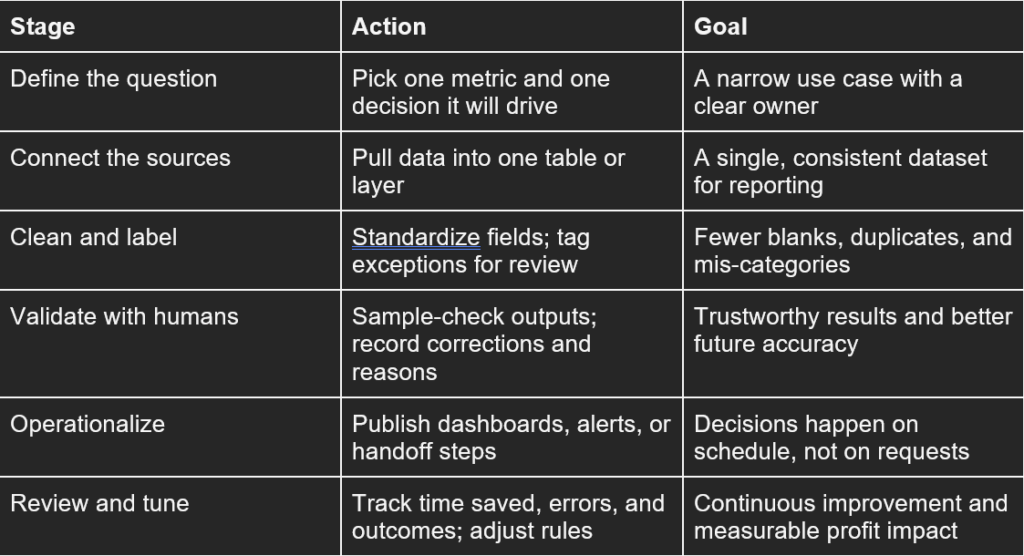
If you think of automated data integration as the backbone, this rhythm adds the business
controls that prevent “automation debt.” Each loop makes the data cleaner, the model steadier,
and the actions easier to repeat.
Common AI Adoption Questions, Answered
Q: How can AI and machine learning reduce the stress of handling large volumes of
business data?
A: AI can automate the most exhausting steps like consolidating files, flagging duplicates, and
routing exceptions for human review, so you stop babysitting spreadsheets. Start with one
repeatable task such as invoice categorization or customer list cleanup, then measure hours
saved and fewer errors. Keeping a manual approval step reduces anxiety while confidence
builds.
Q: What are common signs that my data processing methods are inefficient and need
updating with AI?
A: If the same report gets rebuilt every week, numbers do not match across teams, or fixes live
only in one person’s head, you are paying a hidden “rework tax.” Another sign is slow response
time: you learn about a problem after it has already hit cash flow. A quick audit of where data is
copied, retyped, or reconciled shows the best AI targets.
Q: In what ways can machine learning help simplify complex data analysis to improve
daily decision-making?
A: Machine learning can turn messy history into simple signals, such as “stockout risk,” “late
payment likelihood,” or “customers at churn risk,” so managers act faster. It also helps standardize classifications, making dashboards more consistent and easier to trust. Use it first
for ranking and alerts, not fully automated decisions.
Q: How can small businesses overcome feeling overwhelmed by the technical aspects of
adopting AI tools?
A: Shrink the scope: choose one metric, one owner, and one data source before expanding.
Budget for privacy and security basics early, including access controls, audit logs, and a clear
policy on what data can leave your systems. It also helps to remember adoption ramps up over
time, and 6% of U.S. companies used AI in 2017, so being a beginner is normal.
Q: What options exist for someone looking to gain the skills needed to implement
advanced AI and machine learning solutions effectively?
A: Start by listing your gaps across data cleanup, basic statistics, and model evaluation, then
map each to a role on your team. Many owners build capability with flexible, certification-aligned
information technology courses online that cover data fundamentals before machine learning.
Turn Better Data Into Measurable AI-Driven Profit Gains
Messy, incomplete, or scattered data keeps small teams stuck in manual work and makes
decisions feel like guesses. The practical path is strategic AI adoption: tighten data inputs, apply
simple automation, and learn just enough internally to manage it safely. When that mindset
takes hold, AI-driven business benefits show up as data optimization outcomes you can see,
cleaner reporting, fewer errors, and faster cycles that add up to operational efficiency gains and
profitability improvement. Fix the data, pilot one AI use case, and scale only what proves value.
Choose one low-risk pilot this week, track one KPI (time saved, error rate, or conversion), and
expand the approach that holds steady over several weeks. That discipline builds resilience and
keeps performance improving even as conditions change.
Courtesy of Lance Cody-Valdez